
Maazan (Hebrew for "balance") is a Hebrew-first, fully RTL nutrition tracking app: a daily food diary with calorie and protein targets, logging in seconds by meal photo, barcode, free text or a recipe link, water tracking, and a target engine that corrects itself from your real data. Maazan is free, and stays free. Maazan Pro is an optional upgrade, not a condition.
Who it is for
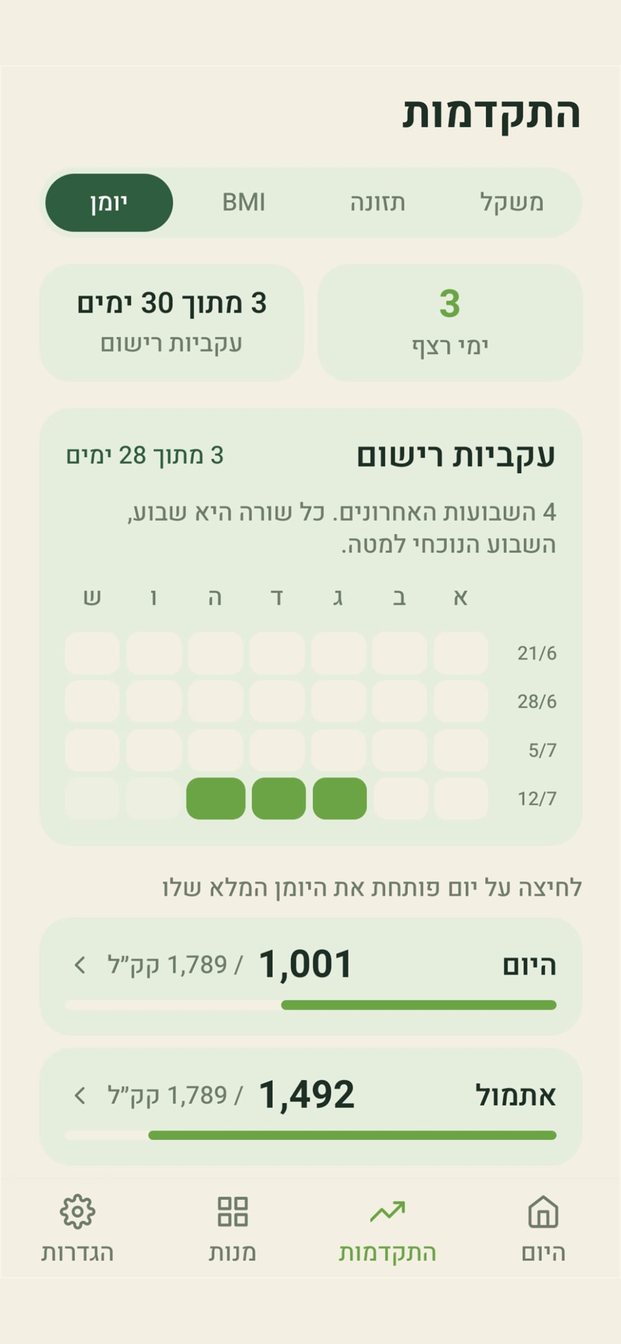
Anyone who wants a nutrition tracker in Hebrew, fully right-to-left, with no account and no signup, in a calm and non-judgmental tone. The app does not scold a high-calorie day and does not celebrate with exclamation marks; it simply shows where you stand today and what is left. No achievement badges, no comparisons, no streak to break.
How it works
- Nine logging paths, one confirmation screen: a meal photo, a photo from the gallery, an image shared from any app, free text in Hebrew ("half a pita with hummus"), a barcode, a photo of the nutrition label, My Foods, a saved dish in pieces, and a recipe from a video or a cookbook page. All converge on a fast confirmation screen where you fix amounts and values before saving.
- A personal catalog that learns: lookups check your own verified catalog first, then Open Food Facts and USDA FoodData Central. Every manual correction is remembered and preferred next time, so accuracy improves with use.
- The Israeli-products fallback: when a barcode is found nowhere, you photograph the nutrition label (with torch, focus and zoom) and the app extracts per-100g values and fills the form, closing the gap international databases leave for Israeli products.
- Adaptive targets: the initial target uses the Mifflin-St Jeor formula; a weekly job then compares predicted vs. actual smoothed weight change, backs out your true energy expenditure and adjusts the target, with a short explanation in Hebrew for every change and guardrails against sharp jumps.
What you get, free
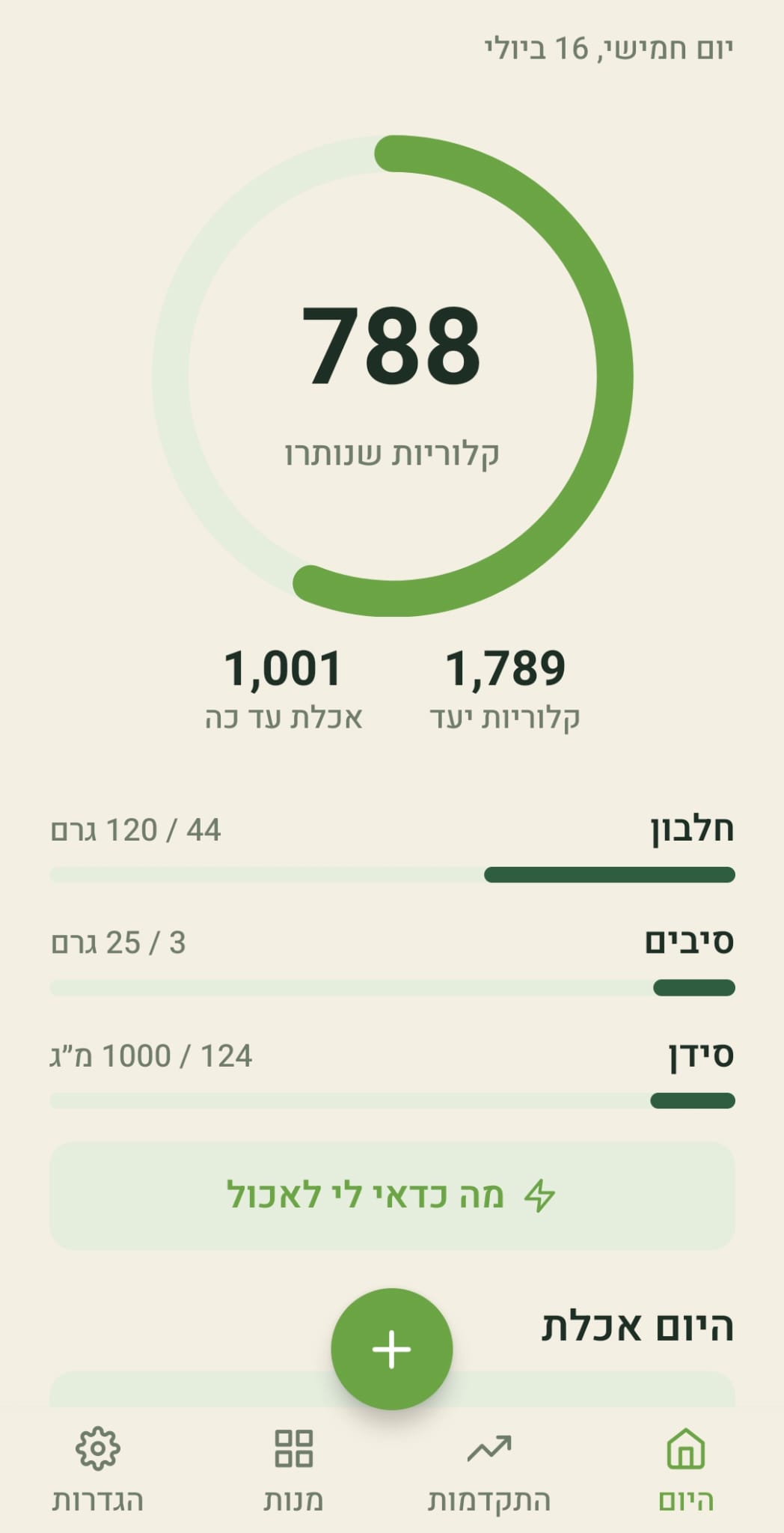
- The Today screen: the calorie ring plus one to four metrics of your choice: protein, carbs, fat, fiber, calcium or sugar, each with a daily target. Tapping the number in the ring toggles between "left" and "eaten".
- Sugar as a metric: a daily limit based on the World Health Organization recommendation, computed for every logged food, from a photo or from text.
- Water tracking: a glass that fills up on the home screen, a daily goal based on the European recommendation (1.6 liters for women, 2 liters for men, plus half a liter on a training day), a Water screen with history, and a reminder to drink.
- A diary by meals: breakfast, lunch, dinner and snacks, each in its own card with a calorie summary and a plus for direct logging. The meal is picked by the time of day and changed with one tap; a single list view is one tap away.
- Breakdown per meal: protein, carbs and fat under every meal's name, and a "Details" button with the calories and values of each ingredient. Ate a slightly different portion? Tap the ingredient and change its amount for today only; the saved dish stays as it was.
- A new add screen, no scrolling: every logging path on one screen, topped by "what you usually have at this hour": the foods you tend to eat right now, logged with a tap.
- Recipes from a video: saw a recipe on TikTok, Instagram or a website? Paste the link or share it straight to Maazan, and it reads the recipe and computes calories and protein per serving, straight into the diary. Free: one recipe a week with full values. Pro: unlimited.
- Regular day and training day: two sets of daily targets, each with its own calories, protein, carbs, fat, fiber and calcium. On a training morning tap "training day" under the date; the ring and metrics turn blue with the higher target, the choice sticks to that date, and the weekly calibration moves both targets together.
- Diet type: vegetarian, vegan, pescatarian, kosher, gluten-free or lactose-free. Photo and text recognition respect the choice: a schnitzel on a vegan's plate is logged as a plant-based schnitzel, with its own values.
- Weight per unit after a barcode scan: a pack of sausages or nuggets suggests the weight of one piece, marked as an estimate, so you log "3" without weighing. A correction by one user serves everyone scanning the same product.
- Dishes divided into pieces: a whole cake, pie or pot is saved once with its number of pieces, and logging asks how many you ate, halves included. Saved dishes are always computed from their ingredients.
- My Foods: everything you ever logged, on one screen, filtered by name and sorted by most eaten or most recent. Favorites live inside it, and one tap returns a food to the diary with last time's amount.
- Drinks in ml: an espresso is 50 ml, not 50 grams. Drinks are detected automatically, and every food has a grams / ml switch.
- One-tap recognition fix: when the photo got the food itself wrong, correct the name and tap "update values from the new name". The values switch to the right food and the amount you set stays.
- Intermittent fasting without a timer: the fast is derived from the diary itself: it starts after the last logged food and ends at the next one, so there is nothing to start and nothing to remember to stop. Windows of 12:12, 14:10, 16:8 and 18:6, off by default, with health caveats shown when it is turned on.
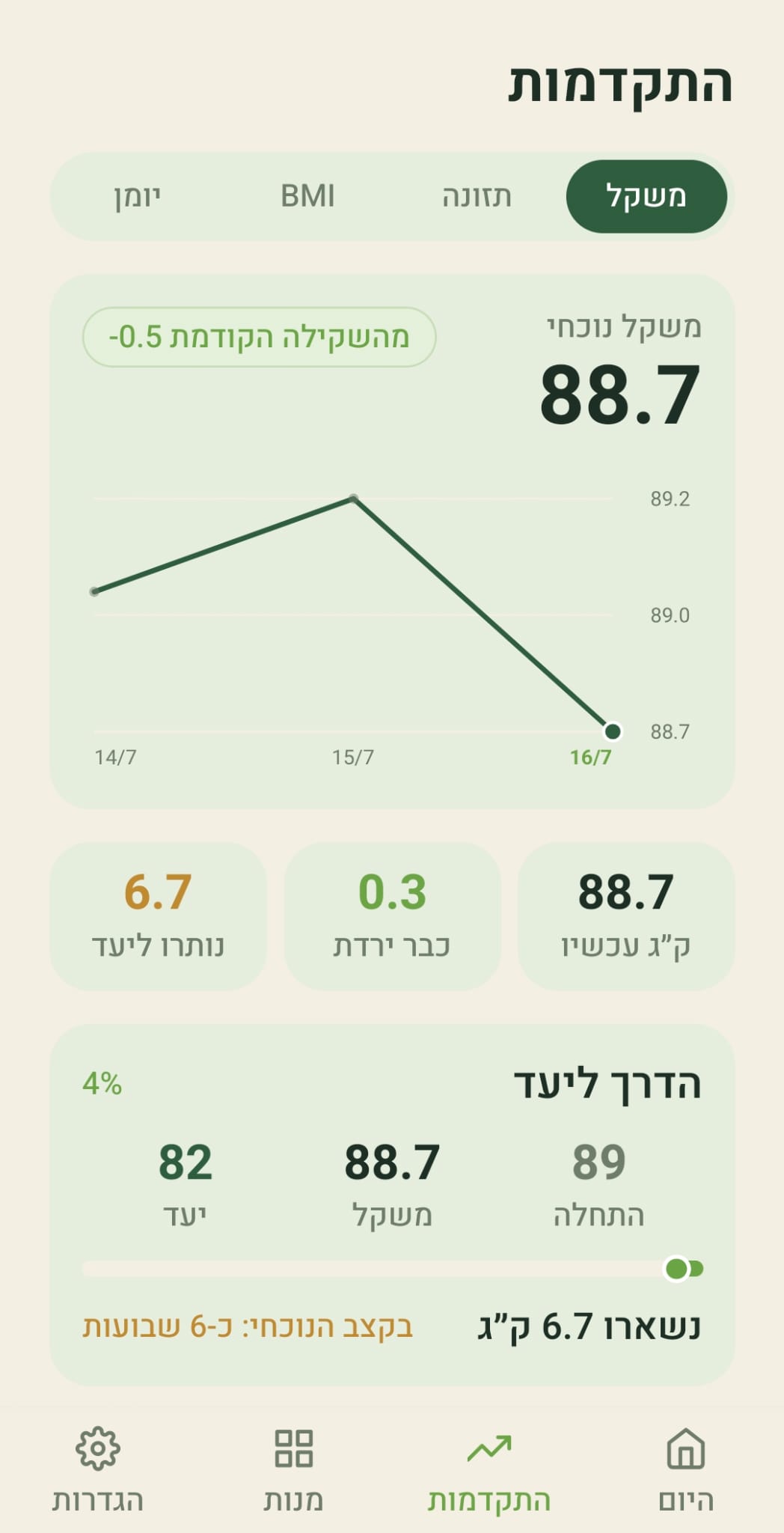
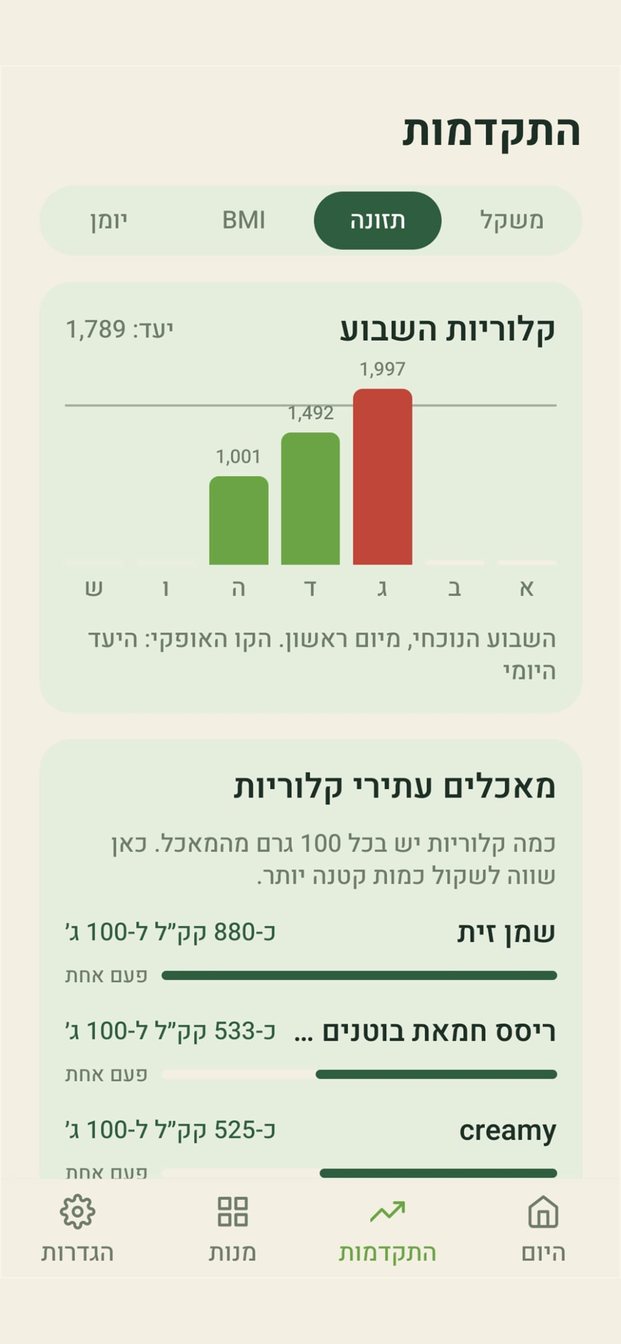
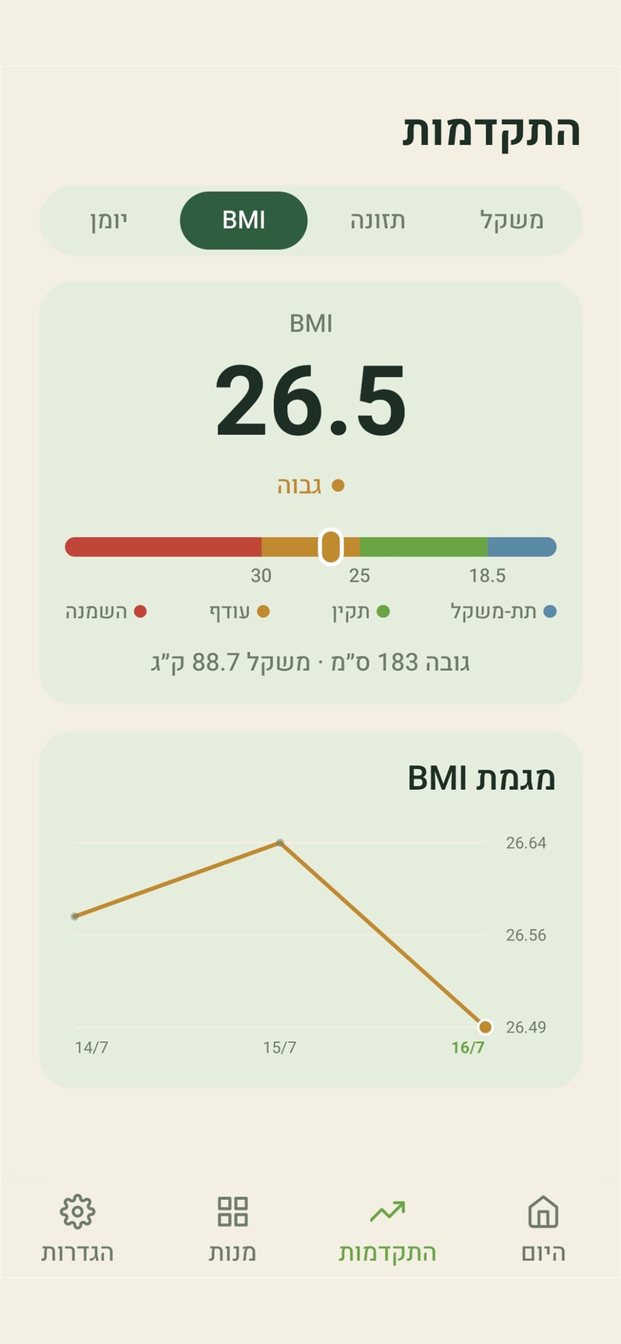
- The Progress screen: four tabs: weight (raw points and a smoothed line, and when you reach the goal), measurements (waist, chest and hips, with the waist-to-hip ratio against WHO thresholds and the waist-to-height ratio), BMI, and the timeline of target changes with the reason for each.
- Flexible reminders: a weigh-in reminder every day or once a week, on the day and at the exact minute you choose, plus logging and water reminders in neutral wording. All off until you turn them on.
- Settings in groups: five groups, each row opening its own screen (targets, notifications, fasting, camera, export and more), so everything is easy to find.
- Dark and light mode: a sun or moon in the corner of every screen, independent of the phone's setting.
- Your data: full export to a file and full deletion from the server, both from Settings.
Maazan Pro
Everything above is open to everyone. Maazan Pro adds what upgrades the daily routine:
- Unlimited meal photos. Free: three photos a day. People who used Maazan before Pro keep what was open to them.
- Unlimited recipes from a video. Free: one recipe a week.
- Home screen widgets: the daily balance (calories left today and one metric of your choice), water (how much you drank today, and a button to add a glass), and quick add (up to four buttons for fast logging: photo, barcode, free text and more). Android also has a widget combining the balance and quick add. Android and iPhone.
- A tidy nutrition report (PDF), generated on the phone itself: calories, metrics, water and weight for the period you choose, to share with whoever accompanies you: a dietitian, a trainer or medical follow-up.
- Includes a Pro subscription in the sister app Balanced Recipes. One subscription, two apps, nothing paid twice.
- No ads, on any screen.
Price: ₪60 a year (₪5 a month) with a 7-day free trial, or ₪10 a month with no commitment; outside Israel the store shows the price in your currency. You buy inside the app, on the Pro screen, directly through Google Play or Apple with no intermediary, and cancel in the store's subscription settings at any time; cancelling within the trial week costs nothing. Already using Maazan? Nothing is taken away: what was open stays open, and Pro only adds. The Pro page on maazan.info (Hebrew) · subscription terms.
Works with Balanced Recipes
Balanced Recipes (in Hebrew: מתכון במאזן) is a separate sister app: a personal Hebrew recipe book that knows the calories and protein in every serving. Save a recipe from Instagram, TikTok, a website, a photo of a page or by typing; it computes the values of every ingredient and every serving, suggests lighter swaps, and walks you through cooking step by step with a timer.
- "Recipe" on Maazan's add screen opens it directly, and building a dish of three or more ingredients in Maazan brings up this suggestion.
- "Send to Maazan" in Balanced Recipes logs the recipe in Maazan as a saved dish, divided into pieces by the number of servings, so you log only what you ate. The link lives on the phone itself, with no shared server.
- Recipes from a video in Maazan is the quick version: a link, values per serving, logged. To keep the recipe itself, continue to Balanced Recipes from there.
- One Pro for both: a Maazan Pro subscription unlocks Balanced Recipes too. In Balanced Recipes tap "I have Maazan Pro", and the app verifies the subscription with Maazan on the phone.
Privacy
No account, no email, no login: identity is anonymous per install. Food photos are used only to extract nutrition values and are deleted immediately after analysis. Data is never sold or used for advertising, and subscriptions are bought from the store, so Maazan never sees payment details. Full privacy policy (Hebrew).
Behind the scenes
React Native with Expo and TypeScript; Cloudflare Workers for all server logic including scheduled jobs; Cloudflare D1 as the database, with no image storage at all (the image is sent for recognition and deleted); Anthropic's Claude for meal recognition from photos and for reading nutrition labels, and a small OpenAI model for text descriptions, after a comparison on 40 real meals from the diaries showed equal accuracy at a tenth of the cost. Before every model call the server checks whether the description is already known from the personal diary or a shared answer cache, and about a quarter of descriptions are answered that way with no model at all. The PDF report is generated on the phone rather than the server, the widgets are native on each platform, and subscriptions are verified against Google Play and the App Store directly, with no third-party billing provider. The Android build runs locally and produces a signed AAB.
Links
- Website: maazan.info (Hebrew)
- Maazan Pro: maazan.info/pro
- Maazan on Google Play
- Maazan on the App Store
- Sister app: Balanced Recipes